SPECIFICATIONS
Part No.: IS220PSCAH1BC
Manufacturer: General Electric
Country of Manufacture: United States of America (USA)
Size: 8.26 cm high x 4.19 cm wide x 12.1 cm deep
Technology: Surface-mount
Temperature Operating: -30 to 65oC
Configurable serial channels: 6
Ethernet Modbus Channel: 1
Technology: Surface-mount
Product Type: Serial Communication I/O Board
Availability: In Stock
Series: Mark VIe
Functional Description
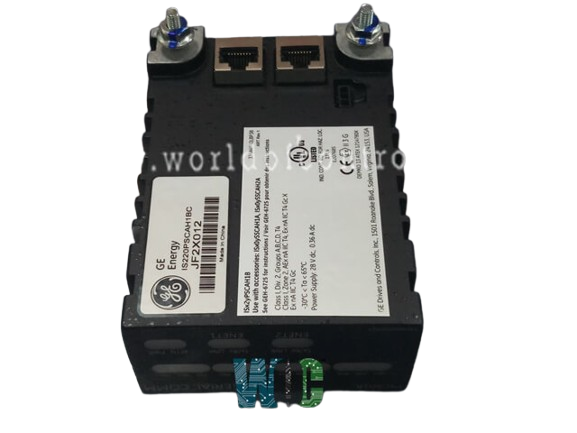
IS220PSCAH1BC is a serial communication I/O board developed by GE. It is part of Mark VIe series. The PSCA serves as the vital electrical interface linking one or two I/O Ethernet networks with a serial communications terminal board within a system. Comprising a processor board common to all Mark VIeTM distributed I/O packs and a dedicated serial communications board, the PSCA provides essential connectivity and communication capabilities. PSCA plays a pivotal role in establishing the electrical interface between I/O Ethernet networks and serial communications terminal boards within the Mark VIe system. By offering multiple communication channels with versatile configuration options, various input and output ports, support for Ethernet Modbus, and visual as well as local diagnostic capabilities, the PSCA ensures robust connectivity and effective communication in industrial settings.
Components and Connectivity
- Processor Board: Common across all Mark VIeTM distributed I/O packs, facilitating standardization and compatibility within the system.
- Serial Communications Board: Hosts six serial transceiver channels, allowing for individual configuration according to RS-232, RS-422, or RS-485 standards. This adaptability ensures flexibility in meeting diverse communication protocol requirements.
- Input Ports: Dual RJ45 Ethernet connectors and a three-pin power input serve as the entry points for input to the PSCA, facilitating network connections and power supply.
- Output Port: The output is directed through a DC-62 pin connector directly linked to the associated terminal board connector, enabling seamless communication between the PSCA and the terminal board.
- Ethernet Modbus Support: One of the Ethernet ports is capable of supporting Ethernet Modbus communication specifically on Simplex Networks, offering expanded communication capabilities.
Diagnostics and Communication Features
- Visual Diagnostics: Indicator LEDs provide visual feedback, aiding in real-time monitoring and identification of communication status and potential issues.
- Local Diagnostic Serial Communications: The PSCA incorporates an infrared port that enables local diagnostic serial communications. This feature facilitates direct and localized communication for diagnostic purposes, enhancing system troubleshooting capabilities.
Status LEDs
- TX LED (Transmit): Flashes when the Pack Serial Communications Adapter (PSCA) transmits data from a port.
- RX LED (Receive): Flashes when a port is receiving data.
- Green LED (PWR): This LED shows the presence of control power. When lit, it indicates that the pack is receiving power and is ready for operation.
- Red LED (ATTN): This LED indicates the pack status and can show five different conditions:
- LED Off: No detectable problems with the pack.
- LED Solid On: A critical fault is present, preventing the pack from operating. Critical faults include detected hardware failures on the processor or acquisition boards, or no application code loaded.
- LED Flashing Quickly (1/4 cycle): An alarm condition is present in the pack, such as incorrect pack placement on the terminal board, no terminal board, or errors loading the application code.
- LED Flashing at Medium Speed (3/4 cycle): The pack is not online.
- LED Flashing Slowly (2 cycle): The pack has received a request to flash the LED to draw attention to it. This is used during factory tests or as an aid to confirm physical location against ToolboxSTTM settings.
Installation Procedure
- Mount the Terminal Board Securely: Securely mount the desired terminal board in the designated location where the PSCA pack will interface.
- Connect PSCA Pack to Terminal Board: Directly plug one PSCA pack into the terminal board connector, ensuring a secure and snug fit for proper connectivity.
- Secure the Packs Mechanically: Mechanically secure the PSCA pack using the threaded inserts positioned adjacent to the Ethernet ports. These inserts should connect with a mounting bracket specifically designed for the terminal board type. Ensure that the bracket's location doesn't apply right-angle force on the DC-62 pin connector between the pack and the terminal board. This adjustment might be necessary only once during the product's lifespan.
- Connect Ethernet Cables: Plug in one or two Ethernet cables based on the system configuration. The PSCA pack can operate over either port. If using dual connections, conventionally connect ENET1 to the network associated with the R controller. However, note that the PSCA is not sensitive to Ethernet connections and can function properly over either port.
- Apply Power to the Pack: Apply power to the pack by plugging in the connector located on the side of the pack. The I/O pack has inherent soft-start capability, negating the need to insert this connector with the power removed from the cable. This capability controls current inrush when power is applied, ensuring smooth and controlled power activation.
- Configure the I/O Pack: Configure the I/O pack according to system requirements and specifications, ensuring it is set up correctly to fulfill the intended functionality within the system architecture.
The WOC team is always available to help you with your Mark VIe requirements. For more information, please contact WOC.
Frequently Asked Questions
What is IS220PSCAH1BC?
It is a serial communication I/O board developed by GE under the Mark VIe series.
Can the PSCA support Ethernet Modbus Master Protocol?
Yes, the PSCA can utilize one of its two Ethernet ports to facilitate the Ethernet Modbus Master Protocol. However, it's important to note that this configuration is exclusively compatible with a simplex network setup.
Are there any restrictions on IP address allocation for Ethernet Modbus?
Indeed, the Ethernet IP address assigned for Modbus operations must not fall within the range specified by the IONET submask range. This allocation prevents IP address conflicts and ensures proper segregation between Ethernet Modbus and other network functionalities.
How are Ethernet Modbus stations configured in the system?
All Ethernet Modbus stations are configured specifically on Port 7 using the ToolboxST application. This centralized configuration process ensures consistency and uniformity among the Ethernet Modbus stations, simplifying management and operation.